Shopify Traffic Drop: How to Find the Cause Before You Fix Anything
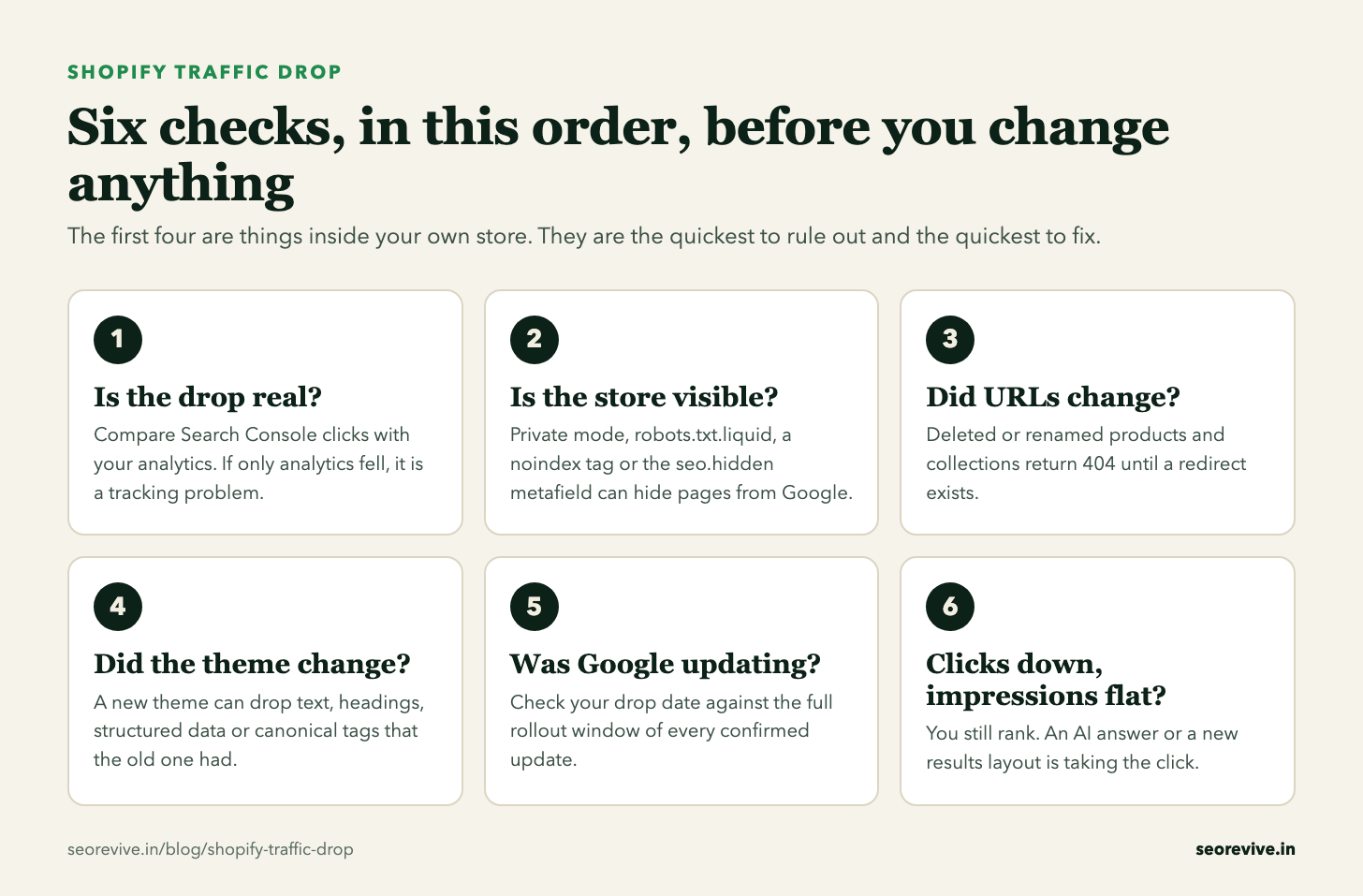
When a Shopify store loses Google traffic, the first instinct is to change things: the theme, the titles, the apps. That is how a one-week problem becomes a three-month one. A drop usually traces back to one cause, and the checks below take about an hour with Search Console and the Shopify admin. This page gives the six checks in the order that rules causes out fastest.
Why did my Shopify store’s traffic drop? There are six usual causes: tracking broke, the store or some pages became invisible to Google, URLs changed without redirects, a theme change removed what Google was ranking, a Google update re-rated the site, or an AI answer is taking clicks you still rank for.
Check them in that order. The first four are inside your own store and are the fastest to fix. Only when they are clean is it worth asking whether Google changed something.
- A confirmed Google update was rolling out on 29.5% of days from January 2022 to August 2026, so a drop often overlaps one by coincidence.
- In our seven-site Search Console study, the page-one site with 1.7% of its impressions inside AI features earned a 4.3% click-through rate. The one at 30.2% earned 0.7%.
- On one hacked site, clicks went from about 200 a day to 1,462 while impressions stayed flat, eight days before Google demoted it.
From our dataset of every confirmed Google update, the AI Overviews study and the hacked-site case.
Check 1: is the drop real?
Open Google Search Console, go to Performance, set the range to the last 6 months and switch on clicks and impressions. Then open your analytics for the same dates.
If Search Console clicks are steady and only your analytics fell, nothing happened in Google. Tracking broke. On Shopify that often follows a theme change, a new cookie banner, or an analytics app being removed. Fix the tracking and stop there.
If Search Console clicks fell too, find the first day they sat below their normal range and stayed there. Write that date down. Everything after this depends on it.
Checks 2 to 4: what changed inside the store
These are the causes that belong to Shopify itself. Each one leaves a different mark in Search Console, which is how you tell them apart.
The whole store sits behind a password page, so Google sees nothing.
Where to look: Online Store > Preferences > Store access
In Search Console: Impressions fall to almost nothing across every page.
A rule blocks collections, products or the whole site. Shopify’s own help page warns that incorrect use “can result in loss of all traffic”.
Where to look: Online Store > Themes > Edit code > robots.txt.liquid
In Search Console: Pages report: “Blocked by robots.txt” climbing.
A noindex tag in theme.liquid, or the seo.hidden metafield set to 1 on products or pages, often left over from an app or a staging setup.
Where to look: theme.liquid, and the product or page metafields
In Search Console: Pages report: “Excluded by noindex tag” climbing.
The old URL now returns a 404. Shopify redirects only work from URLs that no longer load a page, and only if someone created them.
Where to look: Content > Menus > URL Redirects
In Search Console: Pages report: “Not found (404)” climbing. The lost clicks sit on specific URLs.
The new theme shows less text, drops headings, loses product structured data or changes the canonical tag.
Where to look: Compare the old and new theme on the same product page
In Search Console: Rankings slide over days on the page types the theme changed.
A new primary domain without every old URL redirecting to its match.
Where to look: Settings > Domains
In Search Console: The old domain’s clicks fall and the new one’s do not rise to replace them.
Two Shopify habits are worth singling out. The first is deleting sold-out or seasonal products. The page goes, the URL returns a 404, and every link and ranking that page earned goes with it. Redirect the old URL to the closest live product or collection instead. The second is switching themes without comparing what each one puts on the page. Open the same product in the old and new theme, view the source, and check that the description, the headings and the product structured data are all still there.
If you find one of these, fix it and give Google time to recrawl. These usually recover faster than a Google update hit, because nothing has to be re-rated.
Check 5: was Google rolling out an update?
Only now is it worth looking at Google. And the question is not “was there an update?” because the answer is almost always yes.
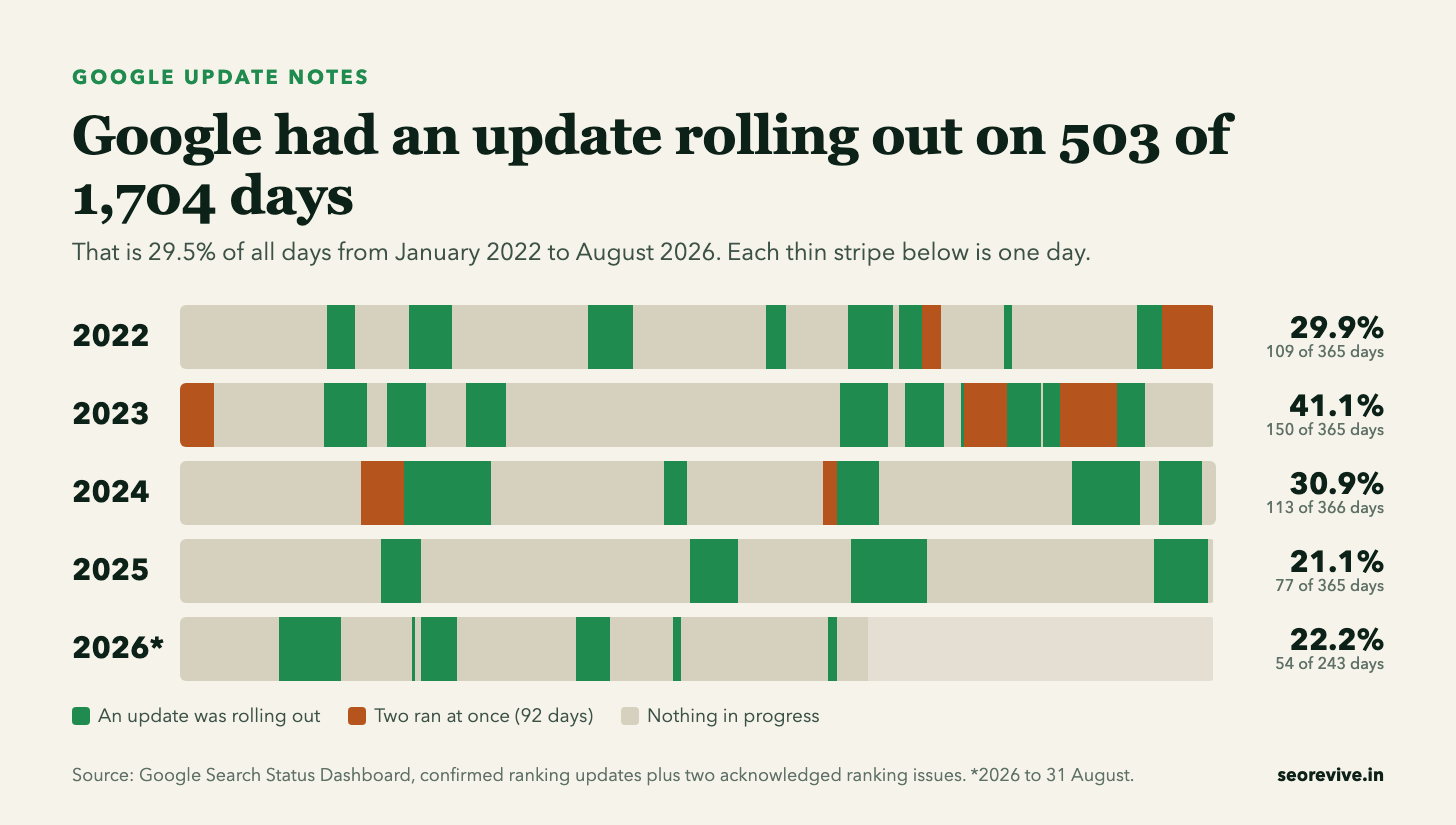
The useful question is whether your drop began inside an update’s rollout window. Updates take days or weeks to finish, so check the whole window and not only the start date. Enter the date from check 1 here:
Know the day your traffic fell? The Google update matcher checks it against every confirmed Google update since November 2021.
Then look at which pages fell. In Search Console, open the Pages tab and compare the 28 days after the drop with the 28 days before. An update hit on a store tends to take a whole page type together: all the collection pages, or all the blog posts, or all the product pages built from a supplier’s description. One product or one collection falling on its own is rarely an update.
If it does line up, the fix depends on the kind of update. A core update asks for better pages and shows its result at the next core update. A spam update asks you to find and remove a specific violation. The guides for each are here: core update recovery and spam update recovery.
Check 6: clicks down, impressions flat
If impressions held and only clicks fell, your rankings did not move. Something on the results page is taking the click. A common reason now is an AI answer shown above the normal results.
We measured this on seven sites of our own. Among the four that average a first-page position, the site with the least AI exposure earned about six times the click-through rate of the site with the most. Position did not explain the gap. The method and every number are in the AI Overviews click-through study.
AI answers appear mainly on informational searches, so on a store this tends to show up on guides and “best of” posts before product and collection pages. Look at which pages lost the clicks before deciding how much it matters.
One pattern that looks like good news
Clicks jump while impressions stay flat, then everything collapses. That is not a lucky week. It is usually spam pages injected into the store’s domain and ranking for searches you never targeted. Sort the Queries tab by clicks and read the top twenty. If you see terms from another language or another industry, clean that first. The full case, with daily numbers, is in what a hacked site looks like in Search Console.
What not to do while you are diagnosing
- Do not switch themes again. You add a second change on top of the first and lose the ability to tell which one mattered.
- Do not rewrite every product title. If the cause was a blocked page or a missing redirect, new titles fix nothing and reset what was working.
- Do not delete “thin” products in bulk. Each deletion is a new 404 unless it is redirected.
- Do not install three SEO apps. Apps can edit the theme, and a later uninstall can leave code behind.
The checklist
- ☐ Search Console clicks compared with analytics for the same dates
- ☐ Exact drop date written down
- ☐ Private mode off, robots.txt.liquid unchanged, no stray noindex or
seo.hidden - ☐ Pages report checked for new 404s, redirects added for removed products and collections
- ☐ Old and new theme compared on the same product page
- ☐ Drop date checked against every update’s rollout window
- ☐ Pages tab: one page type falling together, or one page?
- ☐ Impressions and clicks read separately
The chart and the checklist on this page are free to use with a link back. And if a client’s drop goes beyond a store fix, we can diagnose it and tell them in writing whether it is recoverable, while the build work stays with you. The details are on the white-label page.
Related reading
- Shopify SEO: what actually moves organic traffic
- WordPress traffic drop: the same six checks for a WordPress site
- How long Google recovery takes, by type of drop
- The Google update calendar and statistics
- SEO recovery: diagnosis and fixed pricing
- Site migration recovery: if the drop began at a redesign or platform move
- Google Search Central: debugging drops in Search traffic: the primary source