WordPress Traffic Drop: How to Find the Cause Before You Fix Anything
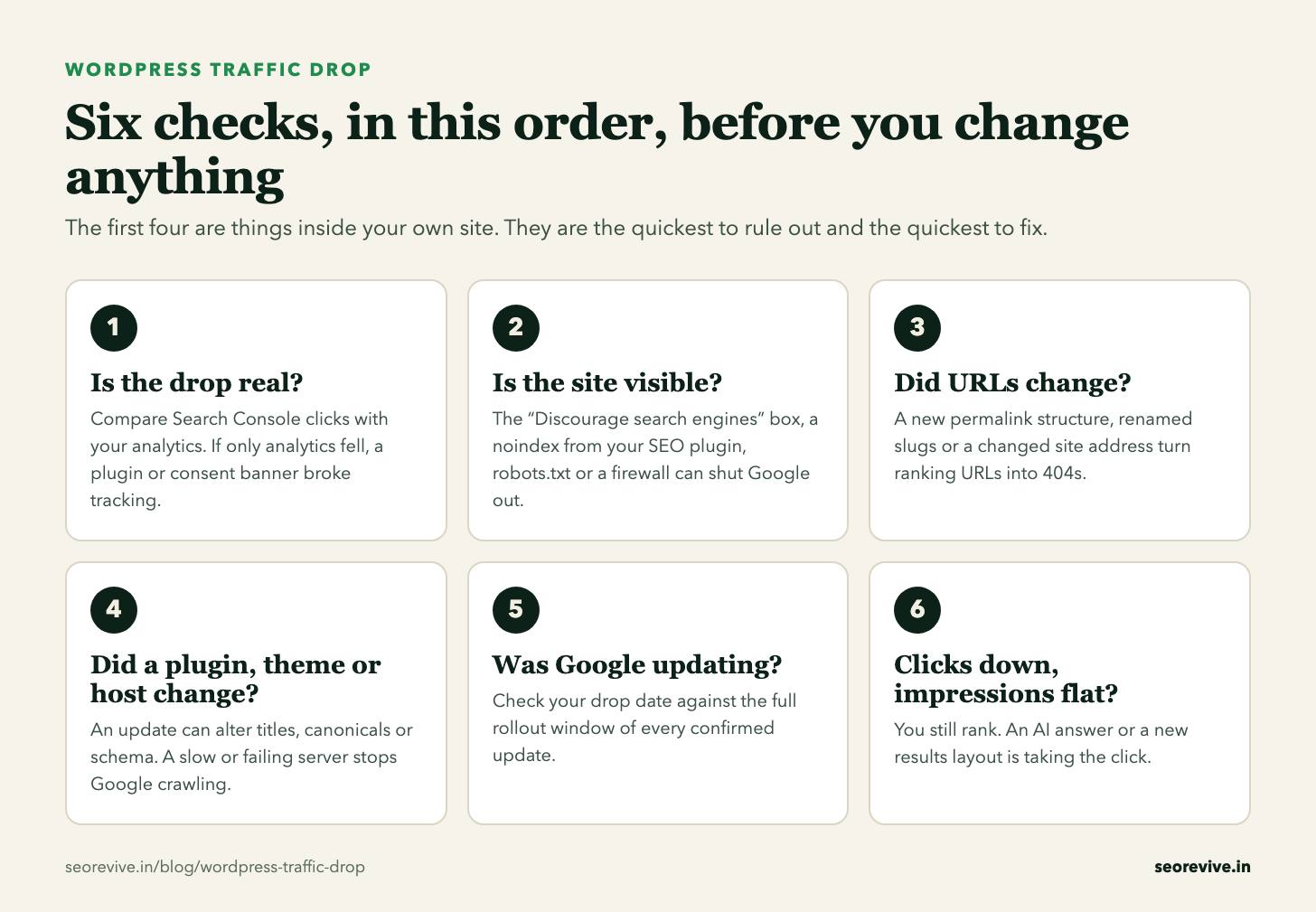
When a WordPress site loses Google traffic, the first instinct is to change things: a new SEO plugin, a new theme, rewritten titles. That is how a one-week problem becomes a three-month one. A drop usually traces back to one cause, and the checks below take about an hour with Search Console and the WordPress dashboard. This page gives the six checks in the order that rules causes out fastest.
Why did my WordPress site’s traffic drop? There are six usual causes: tracking broke, a setting or plugin made the site invisible to Google, URLs changed without redirects, a plugin, theme or hosting change altered what Google sees, a Google update re-rated the site, or an AI answer is taking clicks you still rank for.
Check them in that order. The first four are inside your own site and are the fastest to fix. Only when they are clean is it worth asking whether Google changed something.
- A confirmed Google update was rolling out on 29.5% of days from January 2022 to August 2026, so a drop often overlaps one by coincidence.
- On one hacked site, clicks went from about 200 a day to 1,462 while impressions stayed flat, eight days before Google demoted it. No manual action and no security warning was shown.
- In our seven-site Search Console study, the page-one site with 1.7% of its impressions inside AI features earned a 4.3% click-through rate. The one at 30.2% earned 0.7%.
From our dataset of every confirmed Google update, the hacked-site case and the AI Overviews study.
Check 1: is the drop real?
Open Google Search Console, go to Performance, set the range to the last 6 months and switch on clicks and impressions. Then open your analytics for the same dates.
If Search Console clicks are steady and only your analytics fell, nothing happened in Google. Tracking broke. On WordPress that often follows a theme change that dropped the tracking code, a new cookie banner, a caching or script-optimising plugin, or an analytics plugin being deactivated. Fix the tracking and stop there.
If Search Console clicks fell too, find the first day they sat below their normal range and stayed there. Write that date down. Everything after this depends on it.
Checks 2 and 3: is the site visible, and did URLs change?
These are the causes that belong to WordPress itself. Each one leaves a different mark in Search Console, which is how you tell them apart.
One checkbox asks search engines not to index the whole site. WordPress then adds a noindex tag to every page. It is usually switched on while a site is being built or redesigned and never switched off at launch.
Where to look: Settings > Reading > Search engine visibility
In Search Console: Pages report: “Excluded by noindex tag” climbing across every page type.
SEO plugins can noindex a whole content type (posts, categories, tags, a custom post type) or a single page. One wrong toggle after an update or a settings import removes a whole section from Google.
Where to look: The plugin’s indexing or search appearance settings, and the SEO panel on the page itself
In Search Console: Pages report: “Excluded by noindex tag” climbing on one page type only.
A rule blocks a folder or the whole site. WordPress creates this file on the fly when none exists, and a plugin or a file uploaded to the server can replace it without anyone noticing.
Where to look: Open yoursite.com/robots.txt in a browser and read every Disallow line
In Search Console: Pages report: “Blocked by robots.txt” climbing.
A new security rule, a bot-blocking setting or a host-level limit answers Google with an error while visitors see the site normally.
Where to look: Search Console > URL Inspection > Test live URL on three important pages
In Search Console: Settings > Crawl stats: a rise in 403 or 5xx responses, or a host status warning.
One change here rewrites the address of every post. WordPress’s own documentation says permalinks should be permanent and never change. WordPress sometimes forwards an old address on its own, but not reliably, so test your old top URLs by hand.
Where to look: Settings > Permalinks, and ask whether anyone saved that screen recently
In Search Console: Pages report: “Not found (404)” climbing across the whole site at once.
The old URL returns a 404 and everything that page had earned goes with it. Common during a content tidy-up or a category rebuild.
Where to look: The Pages report’s 404 list, compared with your top pages from before the drop
In Search Console: The lost clicks sit on specific URLs, not across the site.
A move to https, a change between www and non-www, or a new domain, without every old URL redirecting to its match.
Where to look: Settings > General: WordPress Address (URL) and Site Address (URL)
In Search Console: The old address’s clicks fall and the new one’s do not rise to replace them.
The first card is the one to check before anything else. It takes ten seconds, and it is the classic cause of a drop that starts within days of a redesign going live. WordPress notes that it is up to search engines to honour the request, which Google does. Untick it, save, and ask Google to recrawl your main pages with URL Inspection.
If you find one of these, fix it and give Google time to recrawl. These usually recover faster than a Google update hit, because nothing has to be re-rated.
Check 4: did a plugin, a theme or the host change?
WordPress sites change in ways the owner never sees. Plugins update themselves, a developer swaps a theme, a host moves the site to a new server. Go to Dashboard > Updates and Plugins, and list everything that changed in the two weeks before the date from check 1.
Your titles, meta descriptions, canonical tags and sitemap live inside that plugin. Change or remove it without migrating the data and every page falls back to defaults.
Where to look: View the source of a top page and compare the title and description with what Google shows for it
In Search Console: Rankings slide over days across the site. The sitemap may show as “Couldn’t fetch”.
The new theme shows less text, turns headings into plain styled text, hides content behind tabs loaded by script, or drops the structured data the old one printed.
Where to look: Open the same post in the old and new theme (a staging copy or a web archive snapshot) and compare the source
In Search Console: Rankings slide over days on the page types the theme changed.
A slow or failing server makes Google crawl less. A migration can also leave a staging setting, an old address or a broken certificate behind.
Where to look: Your host’s status and error logs for the days around the drop
In Search Console: Settings > Crawl stats: average response time jumping, or 5xx responses rising.
The WordPress cause that looks like good news
Clicks jump while impressions stay flat, then everything collapses. That is not a lucky week. It is usually spam pages injected into your domain and ranking for searches you never targeted. WordPress sites are a common target because one outdated plugin can be enough of a way in.
We tracked this on one site day by day. Clicks went from about 200 a day to 1,462 in nine days while impressions barely moved. Eight days later Google demoted the site. There was no manual action and nothing in the Security issues report, so the owner had no warning from Google at all. The daily numbers and the query table are in what a hacked site looks like in Search Console.
Four checks that take ten minutes:
- Read your top twenty queries. In Search Console, sort the Queries tab by clicks. Terms in another language or from another industry mean pages exist on your domain that you did not write.
- Search Google for
site:yourdomain.com. Scroll past the first page. Look for titles you do not recognise. - Compare the indexed page count with what you published. In the Pages report, an indexed count far above your real number of posts and pages needs explaining.
- Open Users > All Users and filter by Administrator. Any account you cannot name is a problem.
If any of these comes back wrong, stop the SEO work. Clean the site first, close the way in, and only then ask Google to recrawl. Content fixes made on a compromised site are wasted.
Check 5: was Google rolling out an update?
Only now is it worth looking at Google. And the question is not “was there an update?” because the answer is almost always yes.
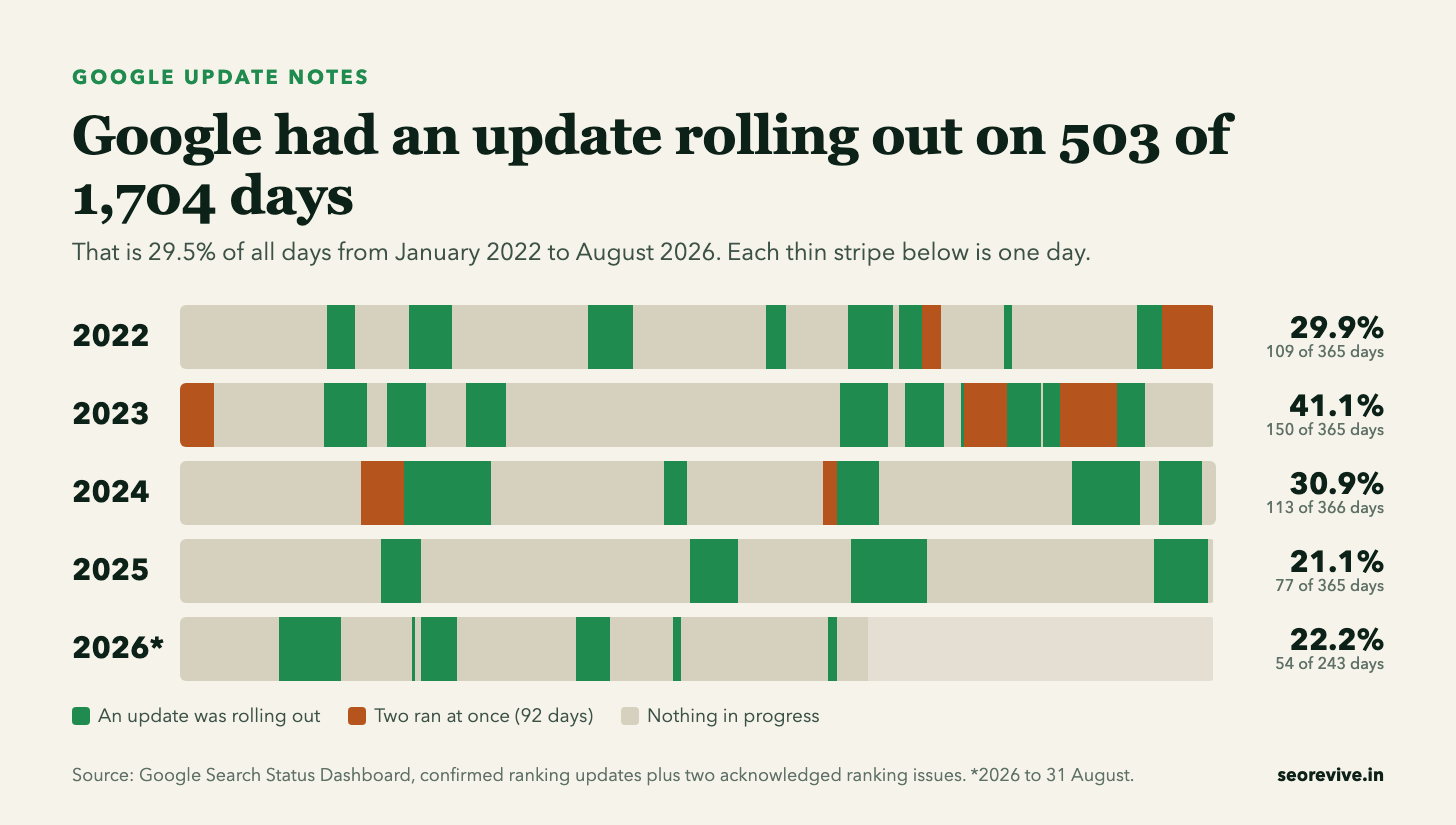
The useful question is whether your drop began inside an update’s rollout window. Updates take days or weeks to finish, so check the whole window and not only the start date. Enter the date from check 1 here:
Know the day your traffic fell? The Google update matcher checks it against every confirmed Google update since November 2021.
Then look at which pages fell. In Search Console, open the Pages tab and compare the 28 days after the drop with the 28 days before. An update hit tends to take a whole page type together: all the blog posts, or all the category and tag archives, or all the location pages built from one template. One post falling on its own is rarely an update.
If it does line up, the fix depends on the kind of update. A core update asks for better pages and shows its result at the next core update. A spam update asks you to find and remove a specific violation. The guides for each are here: core update recovery, helpful content recovery and spam update recovery.
Check 6: clicks down, impressions flat
If impressions held and only clicks fell, your rankings did not move. Something on the results page is taking the click. A common reason now is an AI answer shown above the normal results.
We measured this on seven sites of our own. Among the four that average a first-page position, the site with the least AI exposure earned about six times the click-through rate of the site with the most. Position did not explain the gap. The method and every number are in the AI Overviews click-through study.
AI answers appear mainly on informational searches, which is what most WordPress blogs are built on. Look at which posts lost the clicks before deciding how much it matters, and whether those posts ever brought enquiries or sales.
What not to do while you are diagnosing
- Do not install a second SEO plugin. Two plugins printing titles, canonicals and sitemaps at once create a new problem on top of the old one.
- Do not change the permalink structure “to be cleaner”. It changes every URL on the site in one click.
- Do not delete old posts, tags or categories in bulk. Each deletion is a new 404 unless it is redirected.
- Do not restore an old backup without thinking it through. You lose everything published since, and if the site was compromised you may restore the same way in.
- Do not switch themes again. You add a second change on top of the first and lose the ability to tell which one mattered.
The checklist
- ☐ Search Console clicks compared with analytics for the same dates
- ☐ Exact drop date written down
- ☐ Settings > Reading: “Discourage search engines” unticked
- ☐ No stray noindex in the SEO plugin, robots.txt read line by line, live URL test passes
- ☐ Permalinks and site address unchanged, new 404s redirected
- ☐ Plugin, theme and hosting changes in the two weeks before the drop listed
- ☐ Top queries,
site:search and administrator accounts checked for signs of a hack - ☐ Drop date checked against every update’s rollout window
- ☐ Pages tab: one page type falling together, or one page?
- ☐ Impressions and clicks read separately
The chart and the checklist on this page are free to use with a link back. And if a client’s drop goes beyond a site fix, we can diagnose it and tell them in writing whether it is recoverable, while the build and maintenance work stays with you. The details are on the white-label page.
Related reading
- What a hacked site looks like in Search Console
- Shopify traffic drop: the same six checks for a store
- How long Google recovery takes, by type of drop
- The Google update calendar and statistics
- SEO recovery: diagnosis and fixed pricing
- Site migration recovery: if the drop began at a redesign or platform move
- Google Search Central: debugging drops in Search traffic: the primary source